Latest Posts


Mark Zuckerberg is too young. Born in 1984, he was only one year old when the Coca-Cola Corporation created New Coke. During the three months between the release of New Coke and the reintroduction of Coca-Cola Classic, Zuckerberg was undoubtedly more focused on New Milk than New Coke.

For those of you who are as young as Mark Zuckerberg, I will give you a very brief recap. In April 1985 the Coca-Cola Corporation decided to reformulate their flagship Coke product, which they have been selling successfully for almost 100 years. I won't go into the reasons - you all have Google and can search for that if you care. The bottom line is that Coca-Cola decided to change the product that their customers loved, and then was forced to re-release the original formula due to very vocal (and in my opinion very correct) derision by customers and critics alike. The New Coke debacle has entered the canon of marketing lore as a lesson in what not to do to your product.

Recently, Facebook, Zuckerberg's baby, made another in a long line of sweeping (and seemingly pointless) changes. Since you are reading this blog online, it is safe to assume that you are aware of Facebook, the changes they just made, and the tremendous backlash by Facebook users – myself included. If Mark Zuckerberg were older, he would understand that his company has just released New Coke. He would also know that these changes are a gift to Google, who has just released their Google+ competitor. If you read the history of New Coke, you will discover that after the reintroduction of Coca-Cola Classic, Coke's sales went up dramatically. The net effect of the release and subsequent withdrawal of New Coke was actually very beneficial to the Coca-Cola Corporation. However, somehow I doubt that the customers abandoning Facebook for Google+ will go back to Facebook even if they make a very public mea culpa.

Much has been said about the new Facebook changes. I wont to bore you rehashing what others have covered so eloquently already. But I would like to talk about an e-mail I received from Facebook the day before New Facebook hit the fan. Here is the message:

Facebook will be sending you less email - learn why

We're trying out a new feature to reduce the amount of email you receive from Facebook. Starting today, we are turning off most individual email notifications and instead, we'll send you a summary only if there are popular stories you may have missed.

You can turn individual emails back on and restore all your original settings at any time.

Thanks, The Facebook Team

I think this message is illustrative of the fundamental problems at Facebook. In particular it demonstrates Facebook's spectacular hubris. For some time now users have been able to set their own e-mail notification options – I did so for my account some months ago. Someone at Facebook looked at customer feedback and found the people were upset about the amount of e-mail they are receiving. So they made this change and sent the above message. However, it never occurred to them to ask individual users if that's what they wanted. Every user that enjoyed receiving lots of e-mails now has to go into their account and turn those features back on. Every user that had already customized their email settings needs to go in and see how their settings have been modified.

Here is the message that I believe they should have sent (had they not been so paternalistic in their approach.)
Would you like to get less email from Facebook? We’ve made it easy.

A number of customers have told us that they don't like the amount of e-mail they are receiving from Facebook. We want you to have the best experience possible with Facebook. So, to make it easy for you to decrease the amount of e-mail you're getting from us we put together a quick, one button way to reduce your e-mail clutter.

Simply click here <button>, and we will automatically turn off most individual email notifications. Instead, we'll send you a summary only if there are popular stories you may have missed. Or, if you like your current e-mails settings, do nothing and they will stay the way they are.

If you change your mind you can go to the e-mail options in your Facebook account at any time to turn messages on or off.

Thanks, The Facebook Team

Now wouldn’t that have been easy? You learn that customers aren’t satisfied and give them an option to make the change that you think they want. Being so cock-sure that you know what's best for your customers, and foisting that upon them on your schedule, not theirs, is the utmost in hubris and a recipe for corporate disaster.


I've been a Verizon Wireless customer for many years. I like them a lot and don't understand why anyone (in the US) would use any other carrier. But, there is one thing that bugs the crap out of me - the so called "Robo-Gal" that insists on wasting the time of people that want to leave me a voice message.

My outgoing voice mail message is quick, concise, and to the point (concision is a virtue.) "Hi, you've reached Andrew. Please leave a message at the tone." It takes about 3 seconds, at which point the caller should hear "beep!" Unfortunately, they don't - they hear Robo-Gal (should be "Robo-Gall".) She then tells the listener "At the tone, please record your message. When you've finished recording you may hang up, or, press 1 for more options. To send a fax, press pound. To leave a callback number, press five." Then, finally, the beep. Whew.

Robo-Gal's completely unnecessary message takes about 5 times as long as my greeting, and there is no option to turn her off. I say "unnecessary," because, really, I don't want you to send a fax to my cell phone. Who sends faxes anymore anyway?  I have a smart phone - send me an email!  Geesh.  "Leave a call-back number?" You mean take a giant leap back to the early 1990's when people had pagers? (Can you still buy a pager even if you want one?)  Press "1" for more options? What options? Sending your message with "high priority?" Don't bother - if I like you I will listen to your message regardless of its priority. If I don't like you, I wont. Nuff said.

Fortunately, I have discovered 2 tricks to make things better, and I pass them on to you now. [Thanks to Elko Wireless for pointing me in the right direction.]

Trick #1 - For people who call any Verizon Wireless customer, at any point in the outgoing message, either the "real" greeting, or Robo-Gal, you can just press "*" to skip to the beep. This works regardless of whether you are calling from a land line or a cell phone, and regardless of your carrier. (You can find a list of the "skip" keys for all carriers in the New York Time's article Cutting Through Voicemail Greetings.)

Trick #2 - For people who have Verizon Wireless service and want to decrease the amount of time Robo-Gal spends annoying their callers, you can turn off the options to accept faxes and "callback numbers." With these turned off, Robo-Gal wont include them in her message, thus cutting the time in half. If you call Verizon customer support, they wont tell you about this - I assume that the average Verizon support associate doesn't even know about it. The steps are buried deep in the Verizon voicemail options. I am including the option numbers here, though I have no doubt Verizon changes this stuff with some frequency. Your mileage may vary.

  • Call your voice mail and log in
  • You can listen to any messages you may have, or not. Up to you.
  • Press 4 to change your "personal options"
  • Press 2 to change "administrative options"
  • Turn off the option of receiving faxes:
    • Press 3 to "establish or change" fax options
    • Press 3 to turn fax options on or off
    • Press 1 to turn the fax option on or off
    • Press 2 to turn faxes off (geesh!)
    • Press * to exit
  • Next, turn "callback numbers" off:
    • Press 1 to "change general options"
    • Press 7 to turn the callback number feature or prompt off
    • Press 1 to turn the feature on or off
    • Press 1 to turn the feature off
    • Press 2 to actually turn the feature off
    • Press * repeatedly to exit.
After all that rigmarole, the fax and callback features will be disabled and you're callers wont have to wait through that part of the message. Whew.

PS: I recommend calling Verizon and asking them to change it so that Robo-Gal is an option. Maybe if they hear it from enough people they'll do something about it (like The New York Times wasn't enough.)


There was a time when I never had more than a few messages in my email inbox. Back then dealing with email was a significant part of my job, so keeping a clean inbox was important. Over the last few years my email inboxes have gotten bigger and bigger. Recently my Hotmail inbox had over 800 messages and my server email inbox had almost 700. I also have inboxes on Gmail, Facebook, and a few others, each with a couple dozen messages that were awaiting my attention. Combined, I had over fifteen hundred email messages in my inboxes.

From time to time I would attempt to clean things up. I'd start with the oldest messages, going through the inbox simply deleting those that were trash – either because they were worthless to begin with, or because they were so old that their value had expired. After an hour or two of doing this I would usually have deleted 25% to 30% of the messages. But it wasn't clear that I had really achieved anything. Sure, I had separated the wheat from the chaff, but I still needed to do something with the “wheat.”

I recently read a blurb in Maximum PC magazine suggesting a strategy for cleaning up your inbox. When I read it, I thought it sounded kind of silly; it seemed like a cheat that wouldn't achieve anything. But, I was desperate, so I thought I would enhance the idea a little bit and give it a try. It proved to be very effective; however, it really is just a way to trick oneself into getting the job done.

Without further ado, here it is:
  1. Make three folders for "deferred" messages. I called them Pri0, Pri1, and Pri2 (you can use other names if you prefer.)
  2. Starting either at the beginning of your inbox (the oldest message,) or the end of the inbox (the newest message,) begin reading your email. The advantage of starting with the oldest emails first (my preferred method) is that if you need to take a break, you know right where to resume and you really see the progress you are making. The advantage of starting with the newest ones is that you are taking care of the your new email as you go. The choice is up to you. For each message that you look at, do one of the following: 
    1. If it's trash, either because it was garbage to begin with or because its usefulness is expired (e.g. a Nigerian prince asking you to help him get money out of the country or an invitation to a party that happened a month ago,) then just delete it. 
    2. If it's something that can be filed, then file it. For example, a message with the license key for some downloaded software goes in your "licenses" folder; an email from your mom telling you how wonderful and handsome you are gets moved to your "ego" folder (feel free to read it two or three times before filing it away.) 
    3. If it's something that can be dealt with quickly, then just do it (apologies to Nike.) Then either file it or delete it as appropriate. 
    4. If there's a message in your inbox that's truly urgent, then of course you must deal with it regardless of how much time it might take. For example, if it says "Watch out, Tony Soprano found out where you are and put a hit out on you," you had better deal with it right away regardless of how long it will take (and aren't you glad you're reading your email?!?!) 
    5. Lastly, and this is the trick part, if it's something that you either need to handle, or simply want to read but will take some time, then you put it in one of your deferred folders based upon how important it is: Pri0 being very important, Pri1 messages are important, and Pri2 messages you don't really need to deal with but you'd like to if you have time. 
  3. You may not skip a message, leaving it in the inbox. You must do one of (a) through (e) before moving to the next email.
  4. Do not give in to the temptation to simply copy all of your messages from the inbox to the Pri0 folder!
It's #2e above, moving messages into “deferred” folders, that is really the “special sauce” here. In truth it is a cheat. Moving messages from your inbox to a folder named "Pri0" doesn't actually achieve anything. However, if you follow the rules it has a really important psychological impact.

If you're looking at an inbox with 800 messages and you just go through and delete the garbage, you end up with five or six hundred messages in your inbox. Looking at what you've “accomplished” is actually pretty depressing – you still have five or six hundred freaking messages that need to be handled! Furthermore, when you return to your inbox to deal with those remaining emails, there is no place in particular to start. By contrast, following the proposed strategy you work your way through your mailbox, making it smaller and smaller until finally it gets to zero. It will probably take multiple sessions, but each time you resume the work you can see the progress you made and feel good about doing more.

For me it actually took a couple of weeks. I could've gotten it done much more quickly, but I was interrupted by house guests and the other endless normal events of life. When I was done I had zero messages in my inboxes (Yay!) a total of 62 messages in the two Pri0 folders, 67 in the Pri1 folders, and 236 Pri2 messages. It is true that this is a total of 365, which isn't zero. In fact it is pretty damned far from zero. So it's a total cheat to say that I got to zero messages. However, I did manage to make it from 1500 to 365, a feat which I hadn't been able to achieve before. More importantly, when I go back to my inbox I know where to start. I now need to tackle the most important messages: those 62 unhandled emails in the Pri0 folder. They will be a lot of work, but it isn’t nearly as daunting a prospect as finding and handling the most important messages hiding in a sea of 1500 emails. Furthermore, those 236 “Pri2” messages aren’t really important – I’d just like to follow up on them. So arguably I got the important part of my inbox down to only 129, which is a number I can think about without cringing.

One caveat – if you are someone for whom “out of sight” is “out of mind,” you might need to copy the Pri0’s back into the inbox when you are done. Otherwise, you might be tempted to ignore them.

Good luck!
[Note: FoodPool seemed to be a great idea, developed enthusiasm and momentum, and then stalled. I incorporated FoodPool, Inc as a California corporation and IRS 501(c)(3) charity for the promotion of creating FoodPools all over America. However, we failed in our mission, and as of December 2014 ceased operations. This post remains here for historical interest.]

I've just launched my latest project - FoodPool.org.

For the last couple years I have been growing a serious food garden - I have about 800 square feet under cultivation. I often generate much more produce than I can use. Or, more accurately, the garden produces too much of a given foodstuff at one time. I harvested eighty pounds of onions the other day, and there are still more onions out in the field. With onions, I can dry them and hang them in my root cellar for many months. But still, eighty pounds of onions with more on the way is a lot of onions. The same thing happened with chard. Unlike onions, you can't keep Swiss chard indefinitely, and there is only so much chard I can eat before I get pretty darned tired of it.

I think zucchini is the quintessential over productive garden vegetable. Everyone I know who has ever grown zucchini – even if it was just one plant – tells a similar story. In summer you get that first zucchini fresh from the garden. You slice it up and put it in a green salad without cooking it because you really want to taste pure zucchini. A couple more zucchini are produced, so you chop them up and put them in a stir fry. More zucchini grows, which is great for zucchini bread, zucchini pancakes, and zucchini muffins. The next zucchini as you give to your neighbors. After that you give zucchini to your friends. Later still you give zucchini your enemies. Eventually everyone you know, or have ever met, has all the zucchini they can take. Chances are they have zucchini in their garden too. But your plant isn't done - there is more zucchini on the way.

So what do we do with all this abundance?

Thanks to Michael Pollan, Michelle Obama, Alice Waters, global warming and a poor economy, there is a renewed interest in home gardening. More and more people have gardens full of beautiful food. Often people end up with piles of unwanted zucchini, persimmons rotting on the ground, oranges, apples and lemons hanging endlessly uneated on their trees, and many other extra garden products going to waste. These excess fruits and vegetables actually become a problem, attracting fruit flies, rodents, and other pests.

I see the "problem" of excess garden produce as an opportunity! It is an opportunity to help provide those in need with fresh, ripe, homegrown produce. The only obstacle lies in linking home growers with their hungry neighbors. My answer is "FoodPooling." The goal for FoodPool is to become a "carpool for food." FoodPool.org seeks to enroll people that wish to donate their extra homegrown fruits and vegetables, and connect them with those willing to collect the food and transport it to the food bank.

Initially FoodPool is centered around the Montclair district of Oakland, California. However, I can't imagine anything more wonderful than to see the idea replicated around the country and beyond.

I would be delighted to hear your feedback and suggestions, and welcome support or assistance in any form. If nothing else, please pass this on to anyone you know that might be interested.

Postscript: FoodPool is up and running and doing great!  The original FoodPool Montclair has been delivering fresh produce to people in need for several months now, and FoodPool is expanding with its FoodPool Everywhere campaign. Please join us!

Postscript 2: FoodPool has failed to meet its objectives for encouraging and assisting in the creation of local neighborhood groups for the collection of garden produce. As a result, the board of directors made the difficult decision to suspend operations.  FoodPool as a national organization ceased operating December 2014. There is still a FoodPool operating in West Towson, Maryland.


aka, How Andrew Likes to Waste an Incredible Amount of Time.


DISCLAIMER: The information provided here is for entertainment purposes only.  I do not know if the materials used by Sparklets, or any other early soda siphon makers, meet current standards for safety for drinking water. Furthermore, the gasket forming materials used in this project are not labeled for use in contact with food or beverages. If you should attempt to repair your own soda siphon using the information below, whether successful or not, I guarantee that you and everyone you know will die a horrible death in screaming agony. You have been warned.


One of the most dangerous phrases I know is "how hard could it be?" If you ever hear me say that, run away! That was the phrase that started the endless task of repairing an antique soda siphon I bought some years ago.

I found this soda siphon sometime in the 1990's at a thrift shop in Seattle. When I bought it I knew that all the rubber parts were shot, but I assumed that they could be replaced. Way back then the Internet didn't exist - or at least it didn't provide the universal marketplace that we know and love today. When I got my new treasure home, I went to the Yellow Pages to see what I could find [Anyone remember Yellow Pages? Big, heavy, floppy books full of outdated and incomplete information about vendors in a small geographic area, organized by random categories.] I don't recall what heading I thought was appropriate for antique soda siphon repair parts. Regardless, I didn't find what I needed, so it went up on a shelf as an ornament.

Around the middle of last year I went online to see about buying replacement parts for the soda siphon, since now the Internet provided me access to the entire world's bounty. I found a handful of websites that specialize in selling replacement parts for old soda siphons. Unfortunately, none of them sold parts for Sparklets - the company that made my siphon. One went so far as to explicitly state that they didn't carry Sparklets' parts. I can only assume that this is because Sparklets is out of business, and has been so for a long time. Sigh.

Fast forward to a time earlier this year. I was experimenting with making my own custom shoe orthotics. I read about a technique for making a silicone gel that was moldable into any shape and set up in a matter of minutes. The process involved using GE Silicone I mixed with cornstarch (note, supposedly the more commonly available GE silicone II won't work, though I haven't tried it.) Something about the corn starch allowed the silicone to set up in the absence of air - making it moldable. As it turned out, the resultant material was much too stiff to make a comfortable orthotic. But still, it was an interesting substance to work with. I recalled my antique soda siphon and thought "Hmmmmmm. How hard could it be?"

I went to the hardware store to see what interesting bits and pieces might be available for this project. I decided that before trying to make something with the moldable silicon goop, I would carve some rubber corks into the right shapes - possibly augmenting it with my silicone forming material. That was a total waste of time and money. I didn't get close to producing what I needed.

On my second trip to the hardware store I concluded that I would make a plaster cast of what remained of the existing parts, then form entirely new parts from silcone. It would have been a lot easier if I had known anything about plaster casting, but not knowing anything has never stopped me before. So, I bought a box of plaster of Paris and a jar of Vaseline and headed home to figure it out.


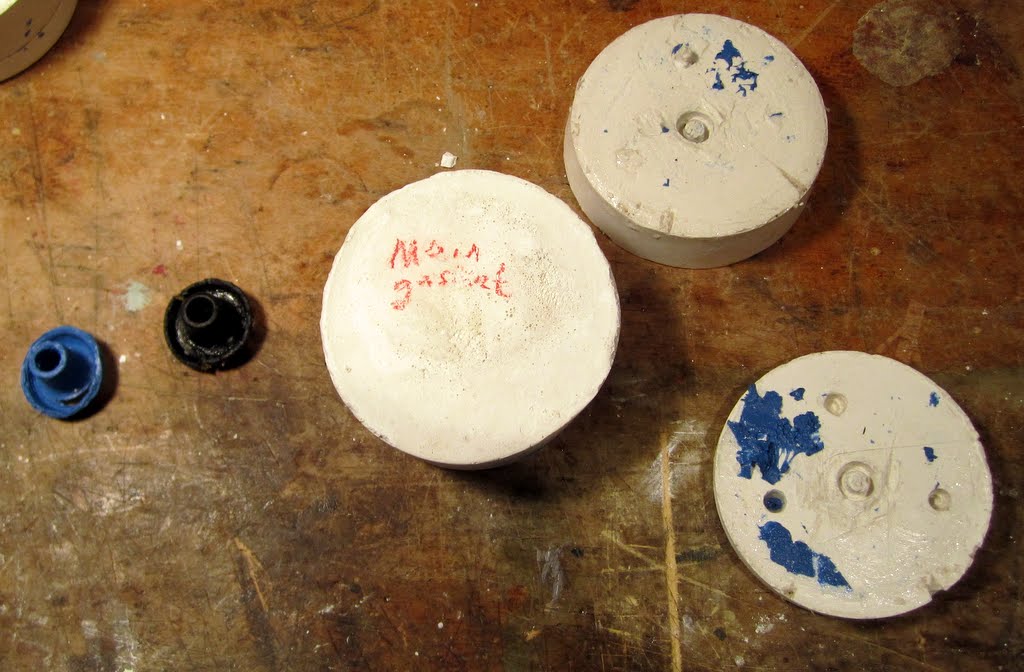
Using the bottoms of plastic cottage cheese containers as forms, I covered the dried up old rubber gaskets with Vaseline, mixed up a small batch of plaster of Paris, and formed the molds for the pieces: first I poured a layer of plaster, into which I pressed a gasket piece to its halfway point. After the plaster had dried, I carved some depressions in the base piece to act as registration marks. [I subsequently improved on that by embedding pieces dowel into the plaster.] I covered it with Vaseline then poured a second layer of plaster to cover the original gasket. Returning the next day I was able to knock the plaster molds out of the cottage cheese containers, and then pry apart the two halves with a screwdriver. Removing the old gasket left me with a nicely formed mold. I did have to wipe off all the extra Vaseline, and there was a certain amount of carving and buffing required to smooth out irregularities in the mold, but basically it was good to go. After all, "how hard could it be?"

I made up a batch of my silicone plus cornstarch goop, re-covered the molds with Vaseline, then schmeared the silicone into the molds with tongue depressors. I pressed the mold halves together (which could only go one way thanks to my registration marks,) and let the silicone set up. Of course I was impatient, repeatedly checking the molds over and over again before they were ready. As a result, the first set of gaskets, while the right shape, were riddled with holes and air pockets because I couldn't leave them alone while they were curing. So I cleaned it all up, tried again, and left it overnight.

When I opened the molds next day the parts looked great - though with lots of extra flanges that I had to cut off within X-Acto knife.


I put the soda syphon back together with my new gaskets, filled it with water, charged it with a soda charger, and tried it out. It worked! Except for two problems: first, water was leaking out of the handle. It turns out that I had missed one rubber part. Second, the silicone plus cornstarch gel made gaskets that were just too soft. The gasket that goes around the head of the soda charger deformed and blew out of its seating during the charging. The gasket that sat at the top of the bottle, though it held for that first use, had basically been cut in half when the top was screwed on. Still, it was exciting to see that the concept worked.

To fix the first problem I had to figure out how to disassemble the bottle top mechanism, which looked simple enough, but was thoroughly frozen together by years of assembly. Eventually, with cleansers, oil, and elbow grease I got the thing apart and found the decayed part. This one was a bit tricky, because it consisted of a metal plunger around which a rubber gasket was formed. Thus, I would need to make a mold that would hold the plunger and form a gasket around it. Tricky, but not impossible. The next day I had my new form ready.


Back to the hardware store I went to solve the problem of the soft gaskets. This time I decided to go with gasket forming compound. I bought a tube of Permatex “Blue” RTV silicone gasket maker. I cleaned up my molds, schmeared them with Vaseline, fill them with gasket material, pressed them tight, and left them for the night. The next morning I pried the molds apart only to find that the gasket forming material had not dried at all. I had been under the impression that RTV silicone sets up without air. I'm not sure how this is supposed to work when making an automotive gasket (the real use for this product.) Supposedly you can put it between two engine parts, clamp it down, and a gasket will form. However, I really don't follow why RTV silicone would solidify in such an environment but not get solid inside the tube. The whole point of adding cornstarch to the GE silicone had been to overcome the problem of making silicon cure without air. In any case, the RTV silicone was supposed to set up when clamped between metal parts - perhaps something about my plaster molds or the presence of Vaseline inhibited it curing. In any case, I cleaned the still-liquid gasket forming material out of the molds, schmeared them with fresh Vaseline, then filled them with gasket forming material to which I added cornstarch.

The next day I open the molds again. Voilà! Beautiful bright blue gaskets that were much firmer than the prior GE silicone-based ones. I cut away the excess with my X-Acto knife, installed them in the soda siphon, and had a go. It worked almost perfectly, but again the damned charger gasket blew out during the charging. And, when I later took the top off, I discovered that the top gasket was partially cut - the blue Permatex wasn't strong enough. Fortunately, the lever no longer leaked.


Once again I went to the hardware store. This time I purchased Permatex “Ultra Grey Rigid High-Torque” RTV silicone gasket material. I cleaned up my molds, made a batch of gray silicone with cornstarch, filled the molds, pressed them shut, and waited overnight. The next day I discovered that for some reason the largest gasket hadn't set up. Evidently there's something about the gray high torque silicone gasket material that required either more time, or more cornstarch to make it cure. I'm sure you know what I did next. I cleaned the mold, made a batch of gasket forming material with extra cornstarch, filled the mold, pressed it shut, and waited overnight.

The next day I had a full set of beautiful gray gaskets. No doubt you will be pleased to know that they worked perfectly, and have continued to do so, charge after charge, for the last couple months.


So now I have a working antique soda siphon. Cool. That wasn't so hard, was it?


To see more, check out my update to this blog post: Repairing an Antique Soda Siphon – Redux.


[Update: As of 12/2013 OCZ has filed for bankruptcy. The articles I have read discuss changing markets, poor strategic decisions, and problems with corporate acquisitions as the main reasons. I can't help wondering if OCZ's total disregard for the happiness of its customers could have been a contributing factor.]

[Update2: Toshiba has purchased the majority of the assets of OCZ Technology. The sale was completed on 1/21/2014. The Toshiba subsidiary is now named OCZ Storage Solutions. I hope that Toshiba will lead OCZ to be more customer focused, though I have had no further contact with OCZ, OCZ support or OCZ products.]


Recently I decided to build myself a new, screaming fast, ultra-quiet desktop computer. The centerpiece of this new machine was to be the latest and greatest in super-high-speed, zero noise storage devices – the OCZ Technology RevoDrive X2.

The fastest types of storage devices commercially available today are "solid-state drives (SSD's.)" These drives use transistors instead of spinning disks to store data. Thus, they are extremely fast and make no noise. Historically SSD's have been manufactured to look and act just like traditional hard disks drives. This was done for backward compatibility. OCZ realized that they could squeeze even more performance out of these devices by breaking with that constraint. Thus was born the OCZ RevoDrive X2, an SSD that plugs into a PCI slot on a computer's motherboard, thereby providing bleeding-edge performance. Needless to say, it was a must-have for my new über-machine.

I spent a week carefully choosing the components for my machine and placing orders from various vendors. When the parts arrived, I gleefully constructed my new killer computer. After building it and loading all my software, I was dismayed to find that its performance was not particularly impressive. It didn't seem to be any faster than my prior machine. In particular the hard disk access (or should I say SSD access) was no great shakes. Moreover, it would seem to lock up from time to time, especially when installing new software (which I was doing a lot in those first few days.)

I decided to run the Windows Experience Index (WEI) to see how Microsoft thought my machine stacked up. To my amazement the WEI showed a reading of only 5.9 for the drive. [The peculiar scale of the WEI runs from 1 to 7.9 – don’t ask me why.] While a reading of 5.9 isn't dismal, I had assumed that the fastest drive money could buy would score a perfect 7.9. Also, my previous computer with an older, earlier generation, ordinary SSD had scored 7.1 on the Windows Experience Index. Clearly something was very wrong.

I surfed to the OCZ Technology website looking for answers. Unfortunately OCZ’s website is very short on support. There is a lot of information about OCZ products, especially documents explaining why SSD's are so wonderful – in particular why OCZ SSD's are supposed to be so great. There are a few brief FAQs, but not much else. It takes quite some time to discover that there's really nothing there, as there is a tremendous amount of marketing materials and other non-relevant, non-support, information under the “support” heading.

It appears that OCZ wants you to find your answers on their community based forums – hosted on a separate web site. There I found several discussion threads created by people experiencing the exact same problem: strange system slowdowns, lockups especially installing new software, and most interestingly, the same 5.9 on the WEI – everyone was reporting this same odd number. Though it was clear that dozens of people were having the same problem, no one from OCZ tech support had weighed in on the matter. All the forum entries were by consumers.

Reading through the forums learned that the benchmark by which OCZ tests its products is a performance test called ATTO Disk Benchmark. So I downloaded ATTO and ran it. ATTO showed that the drive was running spectacularly fast, as advertised. This confusing result was the same that was reported by the other users having problems with these drives: superfast performance on this ATTO synthetic benchmark, mediocre results on a benchmark created by Microsoft (about which no one really knows the details,) and truly disappointing real-world performance. I posted my own info on the forum in the hopes that yet another piece of data might lead to discovery of a solution.

I waited several days, trying various fixes on my own and looking forward to a reply on the forum, but OCZ support was MIA. Finally I went back to the main OCZ Technology website to see about getting some real support. There they tell you that they want you to create an online trouble ticket before calling on the phone. So, I created a trouble ticket pointing to the forum entry that I had written and noting that OCZ should really pay attention to the fact that there were a dozen or more people experiencing the same problem.

A couple of days later a support engineer replied to my trouble ticket stating simply that ATTO is the benchmark they use. A good performance result on ATTO means the drive is working. They marked the ticket “closed.” That was it. Nothing else. No mention of the slow system or lockups, and no recognition of the fact that others were experiencing the problem. I had spent hours futzing with the machine: moving the RevoDrive card from one slot to another; uninstalling and reinstalling device drivers; downloading, installing and running various diagnostic and tuning software; adjusting configuration parameters for Windows and for the other devices in the system; and on and on. Nothing worked. Getting such a useless reply to my trouble ticket was definitely annoying.

I then called OCZ customer support during their limited phone support hours. The engineer I spoke to was very pleasant. He agreed that someone really should be replying to the posts on the forum. He told me that they have dedicated engineers whose job it is to monitor and reply to postings. He promised me that he would get in touch with them and make sure that someone responded to this issue. With regard to my machine, he told me that these problems were almost always problems with other devices in the system. As a result, he said, it was basically impossible for OCZ support to help customers such as myself. He said that I needed to look in the Windows event logs for errors which would help me figure out which device was causing the problem.

So I spent several hours studying the errors and warnings in the event logs. If you've never done this, it is a very painful process. Some of the errors are clear and obvious, but many are exceedingly cryptic. I worked and worked to correct any errors I was able to decipher, though none seemed particularly pertinent, and none of my changes improved anything.

A couple weeks later, with my system still performing erratically, I went back to the OCZ forums where I found even more customers complaining of the exact same problem, but still no comments from OCZ. I called OCZ tech support once again. Once again I spoke to a very pleasant support agent who agreed with me that this was a problem and assured me that someone would read through the forums and reply to postings, even if such a reply was merely to inform people that we must solve the problem ourselves by examining our Windows error logs.

I never did solve the problem. About two weeks after that call my RevoDrive went kaput. From another machine I went to the OCZ forums looking for advice to see if there was any way to salvage the drive. There I found countless other postings by people complaining of the exact same failure that I had just experienced. [The 240Gb RevoDrive X2 is internally really four 60Gb drives in a RAID0 configuration. The system reported that one of the four drives had failed, rendering the RAID0 inoperable.]

In this case OCZ customer support had been replying to users’ complaints. The standard reply advised shutting down the machine and unplugging the power for one hour to completely clear the memory and system BIOS settings. Everyone who was experiencing the problem and tried this replied that it hadn’t fixed the problem. Failing that, apparently the only option was to return the drive for replacement. According to many posters this could take a month or more (which is completely unacceptable.)

Just for yuks I posted my own information to the forum about my RevoDrive dropping dead. In response to my posting, OCZ customer support told me to unplug the machine for an hour. Surprise, surprise! It did no good. Furthermore, in their reply OCZ tech support pointed me to the forum rules which state, quote:
Moving forward there will be a dual 3 strike rule, you have 3 posts or 3 warnings to add user system details, after that you will be placed under moderation and no help or advice will be offered.
I can't tell you how warm and fuzzy it makes me feel to have a company's customer support organization tell me that if I don't provide them with all of the information they ask for I will be cut off from assistance. So, not only is OCZ tech support useless, they are also rude. . Keep in mind that this is a very expensive drive that didn't work correctly from day one and cost me many hours of my valuable time. This SSD alone costs more than many computers. It is fair to say that I paid a premium price for a premium product. I think OCZ should provide premium support for such a product, and they should provide that support without the attitude. A policy warning me that I am out in the cold if I don’t deign to give them every system stat they want up front is lame, lame, lame.

At this point I had no desire to own another OCZ drive and I certainly wasn’t about to wait a month to get a replacement. Unfortunately, by now I had owned the unit past the point where Amazon will accept returns on computer disk drives. My previous SSD had been from Intel – a company known for the reliability of their SSD's. I decided to just say goodbye to the money I had spent on the OCZ. I went on Amazon.com, where I placed an order for the latest and greatest Intel SSD, which is plenty fast and reputed to have rock-solid reliability. I also sent an e-mail to Amazon.com customer support telling them about my experience and asking if they would be willing to take the RevoDrive back. The next day I received a reply from Amazon with an RMA number and a UPS shipping label to return my broken RevoDrive for a 100% refund. Yay Amazon!

It is important to remember that OCZ technology is a company that relies on "influential early adopters" like me. Their customers are people who are into technology and willing to pay extra for the newest and best hardware products. They are also dependent on the type of customer that Malcolm Gladwell dubbed “mavens,” in his book The Tipping Point – customers who make markets by communicating their experiences to others.

It is suicide for a company like OCZ Technology to ignore dozens of reports on their forums. In most businesses it is assumed that if there is one customer complaining there are probably tens, hundreds, or even thousands of people with the same problem. Those multipliers are somewhat lower in the world of bleeding-edge technology where customers are likely to go to the forums when they experience problems. Still, if there are a dozen people complaining about slow and flaky SSD’s, there are probably hundreds of disgruntled customers out there experiencing these problems to one degree or another.

OCZ is failing to support their most important customers – those vocal, early adopters that make or break a new technology. I have never needed their customer support before, but now that I have experienced the fact that they are clearly shipping out products that are not ready, and are then failing to support them, I have concluded that they are not company that I want to do business with. There are dozens of component manufacturers vying for dominance in this marketplace, so there is no need to patronize one that has failed so badly and with such apparent arrogance.

Normally I wouldn’t write a company off based on one bad experience, but in this case, both the product and support were so bad that OCZ is on my “black list.” I encourage others to avoid the OCZ RevoDrive X2, or, at least to read the OCZ forums to see what users are saying before investing in this expensive, half-baked product.


I was making a pot of coffee this morning when I was stopped in my tracks by the view out my window.

I am always fascinated by the fact that humans find things in nature beautiful - even when those things have forms and functions entirely unrelated to us. A spider makes a web to catch insects, not to please people with its geometry. Dew forms on the web because of the laws of chemistry and physics. Sunlight sparkles off the dewdrops, again due to physics, not through a desire to dazzle the human eye.

Enjoying the flowers of a newly developed rose or a tulip straight from Holland is no great surprise. Horticulturalists worked hard to hybridize those flowers to appeal to us. That we find beauty in the unadorned natural world is less clear - though it too makes perfect sense. Assuming that you believe the theory of evolution (which is a safe assumption, given that 100% of credible evidence supports it,) it is clear that everything that has made the natural world what it is, has also made us what we are. The forces that created nature also created homo-sapiens. Form and function, symmetry, color, the signals of ripeness and poison, the scents that attract or repel - all of these things are built in to every living thing on earth.

So really, it is no great surprise to be dazzled by dewdrops on a spider's web in the morning. Still, it is no less a delight.
How to make Norton Ghost 15 do a remote backup on Win7 x64, plus thoughts on Network Attached Storage and backing up machines.

Note: This is a very special-interest blog... just passing along some things I learned. This will probably not be interesting for most readers.

A while back I bought a NAS (network attached storage) machine on sale to see how I liked it. It came with Microsoft Home Server installed as the operating system. I liked it, but the NAS itself was quite slow - in particular it had a rather lame network card, which is stupid for a NAS device. I also have a full-blown PC on my network which I was using to serve media. I had imagined moving the media to the NAS and retiring the PC, but the NAS wasn't up to the job. So, I retired the NAS instead and kept the PC server.

There was one thing that I had really liked about Microsoft Home Server on the NAS: it was very easy to set it up to backup all of the machines on my network to the NAS every night. It did this using a "pull" methodology (ie - the NAS grabbed data off of the target machines), rather than "push" (where the machines to be backed up run software that puts data on the NAS's disks.) I liked the pull methodology quite a lot - it offloaded the task to the NAS, centralized administration of the backups, and made it easy to schedule the backups so that they happened sequentially, thereby not overloading the NAS.

I wanted to make that happen with my server machine. I couldn't find any way to get the backup features of Microsoft Home Server onto Windows 7 using any Microsoft product - Why? God knows. I happened to have a copy of Norton Ghost 15 that I got for free in a combo deal with something else I had bought, so I figured I'd try that out. Well, it was a complete and total pain in the ass and took hours and hours including a 1/2 hour completely useless online chat session with Norton tech support, and another 1/2 hour session on the phone with Norton with a support agent who knew about half of the answers I needed.

The following is a writeup of how to get this to work. However, after getting it set up I quickly concluded that Norton Ghost 15 just doesn't cut it. It does not provide the granularity of backup that I want. As far as I can tell, it only allows backing up of a machine's system files, or entire disk(s). You cannot choose specific sub-directories. So, after all that work I almost immediately abandoned Ghost. I am now running scheduled tasks on each of the target machines to push data to shares on my server. That works just fine, though I do miss the centralized administration. Oh well.

--------------------------------

Note: all my machines are running Win7 Ultimate 64bit with Windows Firewall. These steps may or may not work on other versions of Ghost or other versions of Windows.

For convenience I will refer to the machine that is performing the backups as the "server," and the "remote" machines that are being backed up as "clients."

1) You need to have agent running on any client machine. Ghost cannot perform a remote deployment of Agent to a Win7 machine. So, you must install Ghost on each client machine. The owners manual says:
You must purchase a separate license for each computer you want to manage.You can deploy the agent without a license for a 60-day evaluation. After thattime, you must purchase and install the license to continue managing the remotecomputer.
However, apparently you cant buy licenses for just the Agent, you will need a full license for Ghost for each machine - server and clients. Also, the "60" days is incorrect. It is 30 days.

2) There are three services that must be running for this to work. "Norton Ghost", "Symantec SymSnap VSS Provider", and "SymSnap Service". Launch the services panel by clicking the start button and entering "services.msc" Find each of these services and set them to "Automatic" and start them. I have no idea why Norton install doesn't do this itself. Also, on my machines I set the Norton Ghost service to run as myself instead of the default Local Service. I don't know if this is necessary or not, but haven't had the time to go back and try undoing that to see if Ghost stops working. Also, I did these steps on both the server and client machines - it is possible that it is only required on the server machine. Again, no time to research further.

3) If you are running a firewall, you must allow Norton Ghost and its services through the firewall. I am using the default Windows Firewall. On the forums there are threads that talk about opening various TCP and UDP ports (notably 135, 136, 1345, 1346, 1347). I found this didnt work (as well as being a pain in the ass to do all the steps required to open these ports for each of the services.) What worked for me in this configuration is:
  • Launch Control Panel/Windows Firewall.
  • Click "Allow a program or feature through Windows Firewall"
  • Find Norton Ghost in the list and turn on the check mark. If it isn't in the list, click "Allow another program", find your NG15 install, which is normally C:\Program Files (x86)\Norton Ghost, go to the Console subdirectory, and add VProConsole_.exe. (note the "_" in the name.)
  • You will then also need to allow the following programs through as well:
    • Console\VProConsole.exe
    • Agent\VProSvc.exe
You should reboot the clients and servers, just to be safe. Now, finally, on the server machine you should be able to see the client machine and do a remote backup. Whew.

Why Symantec hasn't documented any of this, and why Ghost install doesn't take care of it, is beyond me. My apologies for not refining this further, but I killed too many hours making this work already - just wanted to quickly write this up for anyone else facing this scenario. I wouldn't be surprised if at least a couple of the above steps can be removed. If anyone has time to refine this, please add to this thread.


The tomato plants in my garden haven't quite started producing yet, so, about a week ago I bought two organic tomatoes from my local (non-organic) mega-mart. I used one right away, but found that I didn't need the other, so I left it on my counter (one should never put tomatoes in the fridge - apparently a flavor compound called Z-3 Hexenel is destroyed or hindered by low temperatures.)

Yesterday I wanted a tomato to put on a sandwich. I grabbed the "spare" from the counter and immediately noticed that something was wrong. Very wrong. There were weird green bumps all over the skin (or, more accurately, just under the skin.) Here's a color-enhanced detail:


My first thought was "wow, that's really interesting," followed immediately by the assumption that the tomato was full of insects, which generated the automatic, involuntary, "eeeeewwww, grossssss," reaction.

I took my paring knife and made a slit in the skin while holding the tomato over the sink - I expected that some kind of green grubs would come tumbling out. To my surprise, they weren't grubs at all - they were sprouts! The tomato was red and firm, not mushy or rotten at all, but it was full of sprouting seeds.


I've never seen anything like this happen before, either with fruit from my garden or the grocery store (with the exception of obvious things like onions, garlic, potatoes, sweet potatoes, etc, which often sprout if left unused in the cupboard.)

So, I made my sandwich without any tomato, but, at least I got a good story out of the deal.

(PS: FYI, the label on the tomato said "OriginO / Ocia Canada / Organic Biologic" product code 94664.)

This strange plant is one of the newer additions to my garden. It is Aristolochia trilobata, a member of a family of vines commonly called "Dutchman's Pipe."  I have three different "Dutchman's Pipes" growing in my garden. While they all have odd flowers, this is by far the strangest.


One of the others that I am growing, Aristolochia 'durior x elegans', has a flower that is much more reminiscent of its English namesake.

A. trilobata is named for its three-lobed leaves. Its flowers are apparently pollinated by flies, as it smells (I kid you not) like a nice, fresh pile of dog poop. I'm not sure of the function of the long streamer that hangs down from the top of the flower's bell. Perhaps a ladder for insects to climb? This one has a streamer that is almost a foot long!


You may wonder why I am growing such a plant. Well, ever since childhood I have been fascinated by oddities in the natural world. Besides, A. trilobata is a nice, easy to grow vine with attractive, shiny foliage.  So why not?